
CEO & Co-Founder, eAssist
Dr. James Anderson is a practicing dentist and the CEO and Co-Founder of eAssist Dental Solutions, the nation’s leading platform for dental billing. A serial entrepreneur, Dr. Anderson has built multiple successful ventures, including eAssist and nine dental practices in Utah, all driven by his mission to help dentists, their teams, and their patients achieve peace of mind. He co-founded eAssist in 2011 to give dental practice owners the ability to fully outsource their billing departments—a vision that now serves over 2,400 practices nationwide. Under his leadership, the company has formed strategic partnerships with the California Dental Association and Henry Schein, and earned a spot on the Inc. 5000 list for nine consecutive years. In 2020, Dr. Anderson was recognized as Entrepreneur of the Year by Business View Magazine and ranked among the top entrepreneurs in the country by Entrepreneur Magazine. He holds a B.S. in Finance from Brigham Young University, a D.M.D. from Oregon Health & Science University, and completed the three-year O.P.M. program at Harvard Business School. He also serves as Chairman of the Dental MBA Advisory Board at Roseman Dental School.
D7140 vs. D7210: A Common Coding Error
/Updated 12/2025
Managing a busy dental practice means juggling patient care, providers, insurance plans, and never-ending administrative tasks. Add over 800 CDT codes to remember—and it’s easy to see why even experienced team members hesitate before submitting a claim.
Two of the most frequently confused and commonly denied codes?
D7140 and D7210.
These extraction codes look similar, but insurance companies treat them very differently. Understanding the distinction—and documenting correctly—can mean the difference between full reimbursement and claim delays or denials.
This guide breaks down what D7140 and D7210 mean, how to document them properly, why insurers often downgrade D7210, and how to protect your practice’s revenue.
What is D7140?
D7140 Extraction, erupted tooth or exposed root (elevation and/or forceps removal)
D7140 Includes:
- Removal of tooth structure
- Minor smoothing of socket bone
- Closure as needed
D7140 In simple terms:
D7140 applies when the tooth or exposed root is removed in one piece without bone removal or sectioning.
This is considered a “simple” extraction.
What is D7210?
D7210 Extraction, erupted tooth requiring removal of bone and/or sectioning of tooth, and including elevation of mucoperiosteal flap if indicated
D7210 Includes:
- Cutting gingiva and bone
- Removing tooth structure
- Sectioning of tooth
- Minor smoothing of socket bone
- Closure
D7210 In simple terms:
This is a “surgical” extraction requiring additional time, skill, and complexity, meaning it should be reimbursed at a higher rate.
Why D7210 Is Commonly Downgraded
Insurance companies frequently downgrade D7210 to D7140 when documentation doesn’t clearly support the surgical requirements outlined in the code descriptor.
Required Attachments for D7210 (To Avoid Downgrades & Stay in Compliance):

1. Diagnostic Radiographs
- Pre-op periapical showing full tooth and root
- Supplemental images if needed
2. Intraoral Photos
Use these to document:
- Bone removal
- Tooth sectioning
- Flap elevation (if applicable)
3. Detailed Narrative or Clinical Notes
Your documentation must clearly describe the surgical nature of the extraction. Notes should include:
- Whether a flap was elevated
- Whether bone was removed and why
Example: “Tooth fractured below bone level—bone removal necessary to access root section.”
- Whether the tooth was sectioned and why
Example: “Curved roots prevented atraumatic removal—sectioning required.” - Reference attached images (“See attached image.”)
Important:
Detailed, code-specific documentation is the key to avoiding claim delays or denials and staying in compliance.
Supernumerary Teeth: Yes, These Codes Apply
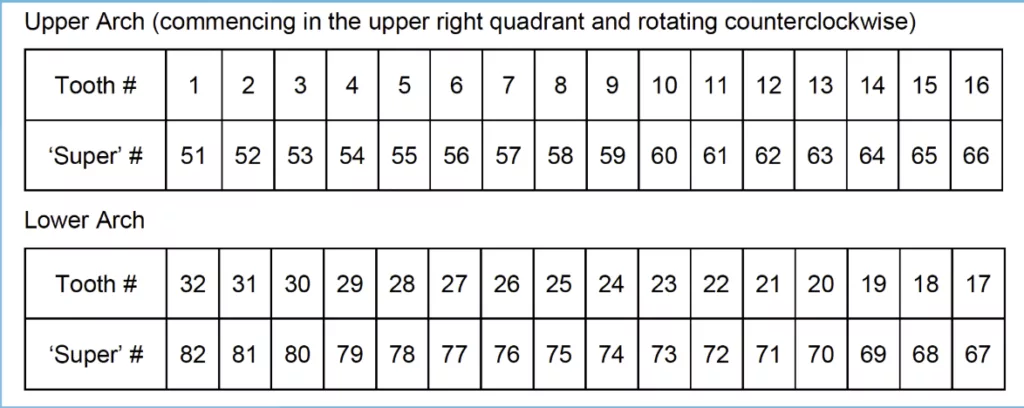
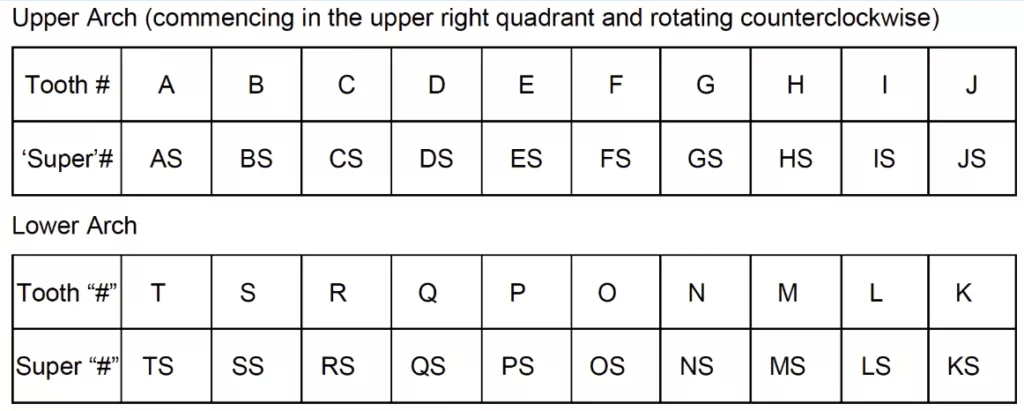
Both D7140 and D7210 can be used for supernumerary teeth, although reimbursement is plan-specific. You can use the charts below to find out how to report supernumerary tooth numbers on the 2024 ADA Dental Claim Form.
Supernumerary Permanent Teeth
Supernumerary Primary Teeth
“Why Did My D7210 Get Downgraded to D7140?”
This is one of the most common frustrations dental offices face.
Insurers downgrade D7210 when the documentation submitted doesn’t meet the requirements of the code.
When a downgrade happens:
- Review your radiographs, clinical notes, and narrative.
- If documentation supports a “simple” extraction (D7140) → adjust the claim.
- If documentation clearly supports a “surgical” extraction (D7210) → submit an appeal with the proper supporting documentation.
Never accept a downgrade without reviewing your documentation—it could cost your practice hundreds of dollars per claim.
Let eAssist Take the Coding and Billing Stress Off Your Plate
Our Success Consultants live and breathe CDT coding. We understand the nuance, the documentation, the insurance behaviors, and the requirements that shift beneath your feet. Most importantly, we get claims paid correctly the first time.
If you’re tired of claim denials, downgrades you know were wrong, endless back-and-forth with insurers, partnering with eAssist is the smartest, fastest way to protect your revenue and your sanity.
To learn more, schedule a complimentary consultation.
Spotlight
The 7 Deadly Sins of Dental Claims Denials
Learn how to avoid the most common claim mistakes and get paid faster.
Download eBook

Dental Insurance Billing Done for You
Discover how eAssist helps practices simplify billing and boost collections.
See How It Works

Talk to a Dental Billing Specialist
Not sure where to start with medical billing? Let’s talk.
Book a Consultation